Startup Office Design
The Startup Home Office: How to Make One Room Do Five Jobs a Day
The Startup Home Office: How to Make One Room Do Five Jobs a Day
At A Glance | |
|---|---|
Why a Startup Home Office Has to Flex | The Gear That Actually Earns Its Keep |
The Workday Is Really Several Different Jobs | How to Design One Room That Switches Modes |
The Mistakes I See Startup Operators Make | A Space That Performs the Way the Job Does |
Why Most Startup Home Office Advice Misses the Point
Most home office advice for remote workers is a shopping list. Pick a monitor, pick a chair, pick a keyboard that costs more than a car payment, and you are done. The tech writers rank gear in the abstract, and the design writers treat the room like any other room, as if the only question is whether the shelving photographs well. Both miss what actually makes startup work different, which is not what you own. It is how many different jobs you do from the same chair in a single day.
I come at this from both sides. I run nearly all of Studio Lou myself, so a single day might move from client design work to writing, to filming social content, to consulting another firm on their marketing, to building a web page. And I live with someone running an even more fragmented version of the same thing. My boyfriend Gavin leads growth marketing at a startup, and he has worked remotely on and off for years, the last two at his current company. No two of his days look alike. One opens with a 7am all-hands on camera with the whole team and barely lets up. Another is internal calls and training sessions back to back. Another is heads-down, monitoring campaigns and cleaning up the CRM, where an interruption costs him twenty minutes. Same chair, same room, completely different days.
That inconsistency is the real design problem, and almost no one writes about it. You cannot design for a routine when there isn’t one. Most startup home offices feel slightly off because they are built for a single mode, usually the gear-heavy focus block, and quietly fail the rest of the week. Mode-switching is not a product you can buy. It is a spatial problem, the kind a floor plan solves for a house: the room has to change function without changing rooms.
This is the framework I would hand to any engineer, growth marketer, founder, or early designer at a startup whose home office has to keep up. We will start with why the space has to flex, walk through the jobs a startup day actually contains, get into the gear that earns its keep (and why more of it usually backfires), and cover the design moves that let one room switch cleanly, with a real operator’s setup as the running example, not a staged one.
Why a Startup Home Office Has to Flex
Walk into most home offices and you can read the assumption baked into them. There is a desk, a chair, a monitor or two, and a general air of a place where someone sits down and does their work. The unspoken belief is that work is one thing. For a lot of jobs, that holds up fine.
Startup work does not behave that way, and neither does running your own business. The defining feature of both is that the work refuses to sit still. In a single day you might present to a room, sell to a stranger, disappear into something that demands total silence, and then put out a dozen small administrative fires that each need just enough attention to be annoying. These are genuinely different kinds of work, each with its own posture and tolerance for interruption, and they are all happening in the same square footage.
This is where the standard advice quietly fails. A traditional office solves the problem with rooms: a conference room for the meeting, a closed door for focus, a kitchen for the breather. The building does the mode-switching for you. At home, you lose all of that. One room, often one corner of one room, has to absorb every function the office used to spread across a floor. The walls do not move and the square footage does not grow when your calendar gets busier, so the room itself has to be designed to shift.
It helps to remember how common this is now. As of 2025, work-from-home days make up about a quarter of all paid workdays in the United States, and the old productivity worry has been put to bed: in a large study published in Nature, Stanford economist Nicholas Bloom found that hybrid work had no negative effect on productivity or promotion rates and significantly reduced how often people quit. For millions of people, the home office is now the primary place serious, varied, high-stakes work gets done. It deserves to be designed like it, not assembled like a dorm room.
The mistake I see most often is treating the home office as a furniture problem. You buy the desk and the chair, fill the space, and assume the doing-the-work part sorts itself out. But a space that only supports one kind of work will fight you every time the work changes, which for this crowd is constantly. The goal is a room that can be a meeting space at 9am, a focus bunker by 11, and a place you do not resent by 6pm, without you having to rebuild it each time.
The Workday Is Really Several Different Jobs
To design a room that flexes, you have to get specific about what it is flexing between. When I look at how Gavin works, and how I work, the day breaks into a handful of distinct modes. Almost no one runs them in the same order twice, but most operators will recognize the majority of this list.
Live mode. Anything real-time with other people, camera on or not. The 7am all-hands, the customer call, the internal training session that runs ninety minutes. What it demands is narrow but non-negotiable: a background that reads as composed rather than chaotic, light on your face instead of behind it, audio that does not sound like a parking garage, and a chair you can sit in for the long ones. The catch is that it can switch on with no warning. A “quick sync” becomes a video call, and the room either holds up or it doesn’t.
Deep-focus mode. The heads-down block where the cost of an interruption is brutal. For Gavin that is monitoring campaigns, untangling the CRM, or design and development work, the kind of making that requires total immersion. For me it is design or writing. Get pulled out and it can take twenty minutes to climb back in. This mode wants the opposite of live mode: minimal visual noise, nothing in your sightline competing for attention, everything you need within reach.
Multitask mode. In a startup, where teams are small and the demands are not, doing several things at once is frequently the job. The clearest illustration of where this is heading comes from engineering: Boris Cherny, the creator of Claude Code, has said he runs 10 to 20 AI coding agents in parallel at any given time. Whether that is a productivity breakthrough or just a faster way to generate the AI slop we spent all of last month warning you about, it points at a reality a lot of operators already feel. The call you take while half-watching a dashboard. The laptop or iPad that comes out because you suddenly need a third surface. This is divided attention on purpose, and it demands flexible surface and screens you can actually reach.
Admin mode. The dozen small fires: inbox, scheduling, approvals, the four-minute task that interrupts something that needed forty. Almost no one designs for it because it feels too minor to plan around, but admin work expands to fill whatever space you give it. A room where the small stuff has an obvious home, and does not creep onto your main surface, protects the focus blocks more than any piece of gear.
Side-project mode. Not everyone has this one, but the startup crowd often does, the evening build that is technically optional but matters. Its need is psychological more than physical: it has to feel different from the day job, or it just becomes more day job. A different chair, a different light, or literally facing a different direction can be enough to tell your brain you have clocked into something else.
Each of these makes a different demand, and several conflict. Live mode wants a styled, lit backdrop; deep-focus wants the visual field stripped bare; multitask wants surface within reach; admin wants the small stuff corralled away. A space tuned for any one of them sabotages the others. That conflict is the actual puzzle of a startup home office, and it is why throwing money at gear does not solve it. You are not under-equipped. You are asking one room to hold several jobs, and no amount of hardware resolves a spatial contradiction. Design does.
The Gear That Actually Earns Its Keep
Here is where I am supposed to hand you a shopping list, and where I am going to push back on the premise. The startup crowd, developers especially, tends to treat the home office as a gear acquisition problem. More monitors, a louder keyboard, a second machine, an arm for this and a mount for that. The logic feels sound, more capability should mean more output, but in practice I watch it curdle into the opposite. Every device claims a piece of the desk, adds a cable, and gives one more mode its own island of hardware. The context switching the gear was meant to help with gets harder, because the room is louder and there is nowhere clear to put your hands and think.
The better question is not what to add, but what earns its place by serving more than one mode. A few pieces genuinely do.
The desk, with room to spare. The most underrated piece of a flexible setup is empty surface. Multitask mode needs somewhere to set the laptop you just pulled in; deep-focus needs the visual quiet a clear desk provides; admin needs a landing spot so the small stuff stays out of your sightline. When people ask what to buy first, I tell them to buy fewer things and a bigger surface. A height-adjustable desk earns its keep on top of that, not for the wellness-poster reasons, but because standing is its own mode-shift.
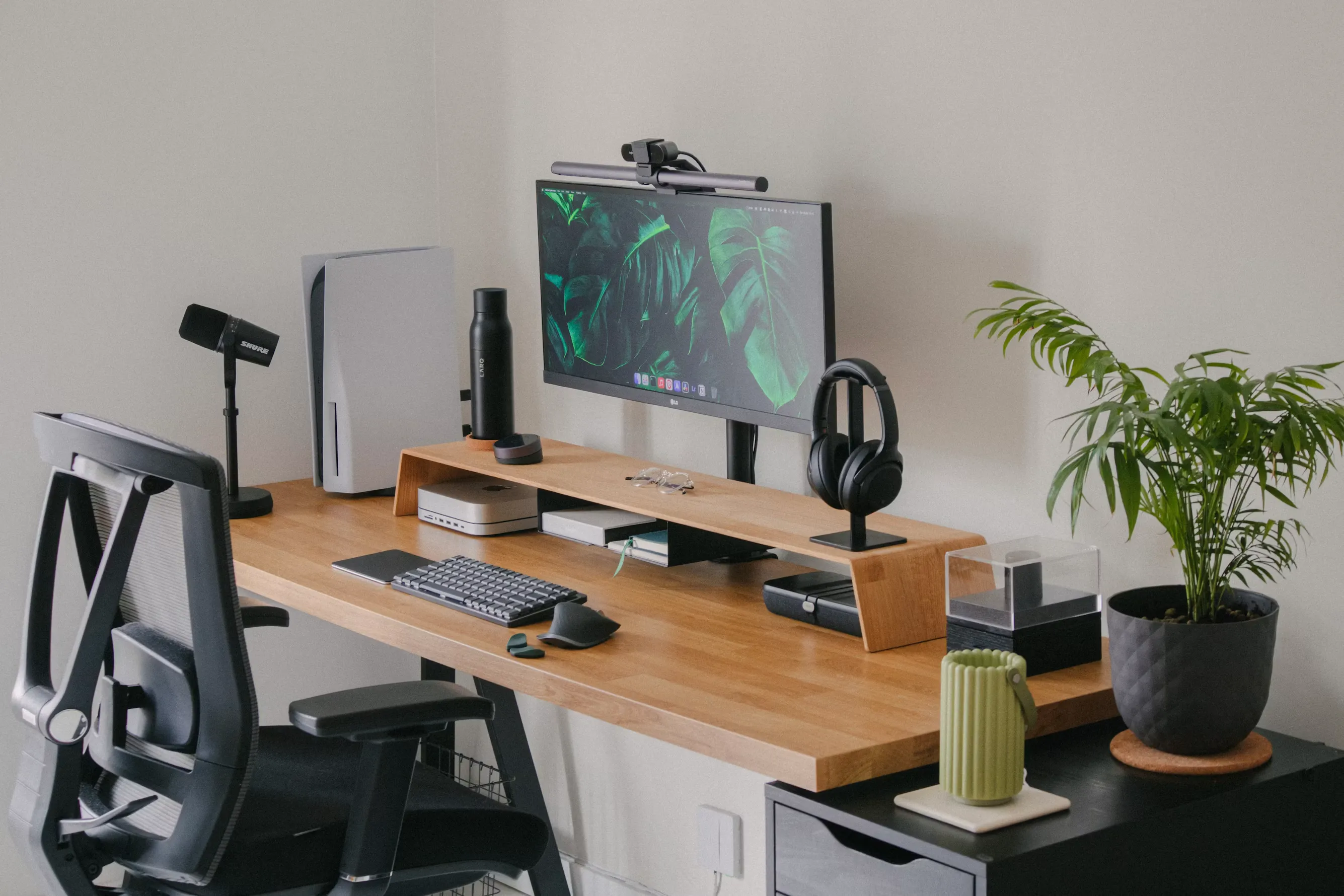
One great screen instead of three okay ones. This is the heart of the gear-overload trap, and it is worth watching someone reason their way out of it. Gavin’s current setup is the classic accumulation: a curved ultrawide, a second monitor rotated vertical for code and long documents, a PC he built, and a laptop or iPad pulled in when he needs another surface. It works, but it is a lot of glass and a lot of room. After enough configurations, the setup he now wants is the opposite of more: a single high-quality ultrawide paired with a small machine like a Mac mini, running through a monitor with a built-in KVM switch. A KVM lets you control two computers from one keyboard, mouse, and screen, switching with a single click, and BenQ builds it into its designer-grade ultrawides specifically to save desk space. One clean screen becomes the work machine, the personal machine, and the side-project machine in turn, while the desk stays open enough that pulling in the laptop is easy instead of a game of Tetris. Consolidate the hardware, free the space, let the room flex.
A decent camera, and the microphone people underrate. Most people's instinct is to fix the camera first, and that instinct is right, a clean, sharp image is the easiest win in live mode. Where people go wrong is assuming audio takes care of itself. It does not, and the reason is rarely fidelity, it is noise. A home is not a conference room. There are kids in the hall, a dog that barks at the mailman, an HVAC system that kicks on mid-sentence. The instinct is to solve that by buying up, and the internet will sell you a streamer's condenser mic to do it. And that's exactly the wrong direction. Those are sensitive by design and pull in every bit of the room you were trying to escape. For everyday calls, the proportionate fix is small, a good headset or a simple USB mic close to you beats a laptop mic and asks almost nothing of your desk. Stepping up to a dynamic mic, the kind whose tighter cardioid pattern rejects far more room noise, is for the people actually recording in that room: podcasts, webinars, regular video. If that is you, something like a Shure MV7+ handles it without turning your desk into a podcast studio. If it is not, do not let a recording problem sell you recording gear.
Notice what is not on this list: no second mechanical keyboard, no triple-monitor array, no gadget whose only job is to look like productivity. If you want the fuller breakdown of office tech that performs without cluttering the room, we wrote a whole guide on stylish home office tech that blends design and function. The pieces that earn their keep are the ones that serve several modes at once and leave the room more open than they found it. Gear should be subtractive as often as it is additive. The best home office purchase Gavin keeps coming back to is the one that removes two devices from his desk, not the one that adds a fourth.
How to Design One Room That Switches Modes
Gear is the easy part. The harder, more interesting work is arranging a single room so it can be several workspaces without you rebuilding it five times a day. It comes down to three moves: zoning, light you can change, and sound you can live with.
Zone by mode, not by furniture. The instinct is to arrange a home office around the stuff, desk here, shelf there, done. The better approach is to give conflicting modes their own territory, even in a small room. The main desk is the focus and live zone, kept deliberately clear. The modes that generate clutter, multitask and admin, need somewhere for it to land that is not your main surface, and this is really a storage question. Closed storage within arm’s reach, a drawer, a credenza, a cabinet, lets you sweep the small stuff out of sight in seconds when a focus block or a camera call starts, instead of staring at the debris of three other jobs. A surface with nowhere to offload onto stays cluttered, and a cluttered main desk sabotages every mode that needs a clear head. If you have the space and the side-project habit, a different chair in a different corner does more psychological work than people expect. The point is not square footage, it is separation. When each kind of work, and each kind of clutter, has somewhere to live, switching stops feeling like clearing the table for a different meal every hour.
Light you can change, because the day does. A startup day spans a 7am call and a 7pm work session, and one light setting cannot serve both. The fix is layers you control independently rather than a single overhead fixture: a front-facing light for live mode so you are lit, not silhouetted, and a warmer, lower lamp for the evening stretches that does not leave you feeling interrogated. The room should shift mood as fast as your calendar does, and light is the quickest lever you have. It matters enough in visual work that we devoted a whole post to designing a home office for creative work.
Sound you can live with, without building a studio. This is the move most people skip, and the one your coworkers notice most. A room with hard floors, bare walls, and a big window is an echo chamber, and every call sounds slightly worse for it. Hard, flat surfaces reflect sound and create reverberation, while soft, porous materials absorb it. The fix is ordinary residential stuff doing double duty: a rug on a hard floor, curtains instead of bare blinds, an upholstered chair, a bookshelf full of unevenly sized books to scatter sound. You do not need a wall of foam wedges, just a few soft surfaces where sound is bouncing, and the room that results is quieter on calls and warmer to be in.
None of these is about adding a gadget. Zoning, light, and sound are design decisions, and they are what let one room behave like several. One last piece of live mode, the camera background, is worth designing with the same intention, and since it is a topic of its own, we covered it in full in our guide to creating a stylish home office background for video calls.
The Mistakes I See Startup Operators Make
A few patterns show up so often in this crowd that they are worth calling out. None are about taste. They are about misreading what the work needs.
Buying the gear before designing the space. The big one, and everything here has circled it. The operator orders the monitors, the keyboard, the second machine, and only then asks where it all goes, by which point the room is organized around the hardware instead of the work. Design the space and the modes first; let the gear fill a plan, not create one.
Optimizing for the demo, not the day. People build for the version of their job they want to show off, the heads-down power-user setup, and neglect the modes that fill most of the calendar. The triple-monitor command center looks impressive and does nothing for the four hours of calls or the admin pile. Design for your most common and most demanding hours, not your most photogenic one.
Treating the room like an office instead of a home. The cold overhead light, the corporate chair, the cubicle that wandered into your house. You are in this room more than anywhere else, and a space that feels institutional wears on you in ways you stop noticing but never stop feeling. Warm materials, a residential lamp, something on the wall you actually like, these are what make a room you can stand to be in all day.
Letting the space stay static. The work moves, so a setup you arrange once and never touch is always tuned for a job you are not currently doing. The best startup home offices have small, fast levers built in, a light you dim, a surface you clear, a chair you turn, so the room keeps up.
These are the startup-specific traps. There is a longer list of mistakes that quietly undermine any home office, regardless of who is using it, and we have a dedicated post breaking those down. The throughline is simple: almost every one comes from designing for the gear or the highlight reel instead of the actual, mode-shifting shape of the workday.
A Space That Performs the Way the Job Does
The startup home office is not a desk and a chair, and it is not a pile of gear that signals you mean business. It is a single room asked to do the work an entire office building used to spread across a floor: meet, focus, juggle, manage, and occasionally make something just for you. The setups that hold up are not the most expensive or the most equipped. They are the ones designed around how the work actually moves, with room to flex when it changes, which for this crowd is constantly.
Stop asking what to buy and start asking what the day actually demands, hour to hour, mode to mode. Once you see the room as a space that switches jobs rather than a backdrop for one, the decisions get clearer and usually cheaper. The best move is often to remove something, not add it.
Want a home office that keeps up with the way you actually work?
This is exactly the kind of problem Studio Lou is built for. Most home office help comes from one of two places, gear reviewers who do not think about the room, or designers who do not understand the work. We sit in the middle, because we live it, a working design studio and a startup household under one roof. If you are staring at a space that almost works but fights you every time the day shifts gears, that gap between almost and actually is where we come in. We design home offices around how you really work, not how a catalog says an office should look. Get in touch with Studio Lou here.
Be the first to know about every new letter.
No spam, unsubscribe anytime.