Home Office Design
Shared Home Office Ideas for Two-Worker Households: A Designer’s Real Setup (and 4 Others That Work)
Shared Home Office Ideas for Two-Worker Households: A Designer’s Real Setup (and 4 Others That Work)
At A Glance | |
|---|---|
Designing for Two People Who Work From Home | 5 Design Problems in Two-Worker Home Offices |
5 Shared Home Office Layouts That Work | 3 Shared Home Office Mistakes I See Most |
Our Shared Home Office Setup | Designing a Shared Home Office That Lasts |
Designing for Two People Who Work From Home
Gavin and I both work from home. Different roles, different schedules, different work styles. He’s the kind of startup operator who wears every hat at once: designing the company’s site, running its marketing campaigns, building the ads, leading growth. His day is mostly calls, Slack, and a lot of simultaneous browser tabs. I’m switching between Figma, client communications, and Studio Lou content production, which from the outside looks quieter than it is.
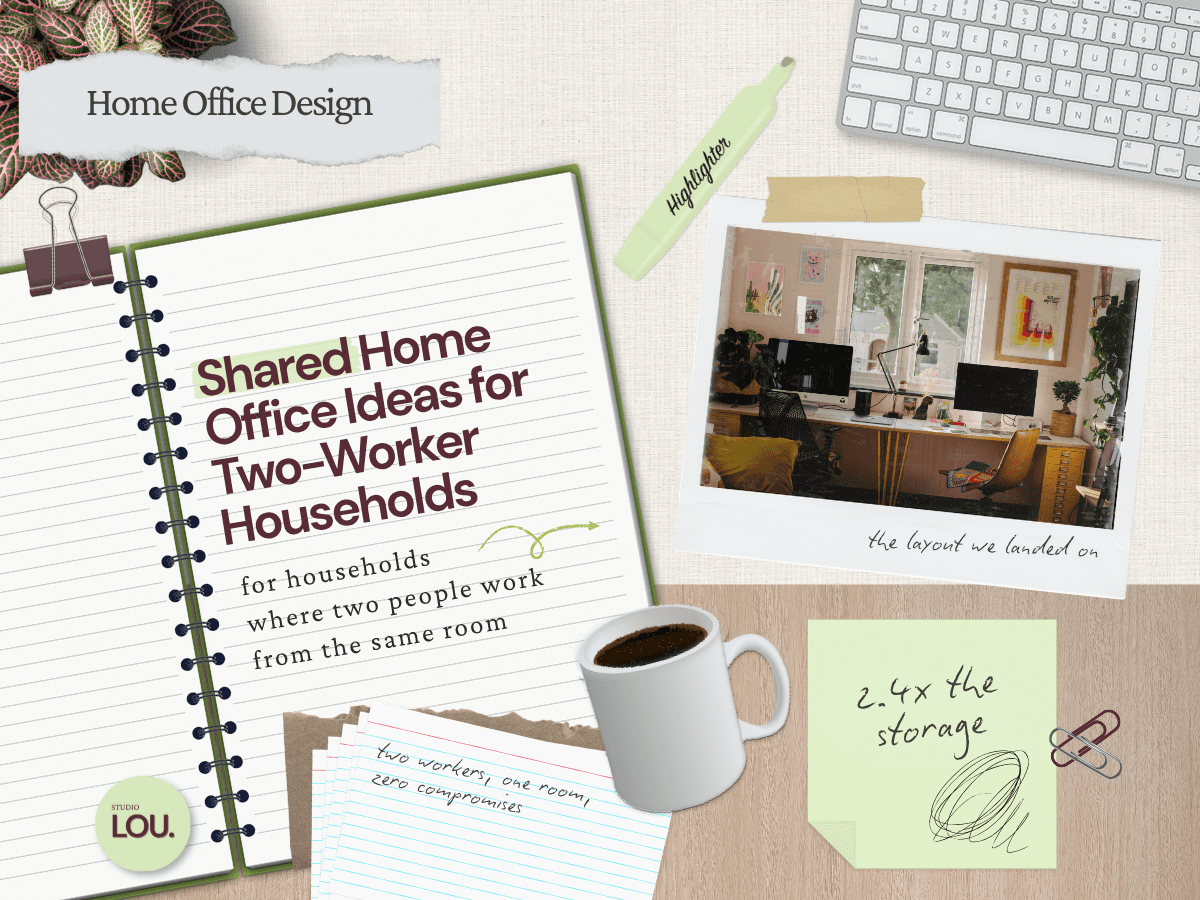
Three years in, across two apartments, we’ve rearranged our shared office more times than I’d like to admit. Opposite walls at one point. Currently on a shared wall, Gavin's desk to the left, mine to the right with a filing cabinet between us, arranged so our cameras both face out and neither of us ends up in the other's frame. We have shared projects, and we help with each other’s work often enough that we needed flexibility in the room, not just two sealed-off zones. We’ve earned the layout we have now.
Most of the advice I see online about shared home offices misses the real problems entirely. The roundup posts cover layouts and matching desk sets. They do not cover what happens when both of you have a 10 a.m. call, or when one person’s working style is visual chaos and the other’s is monastic minimalism, or how the storage need grows in a way that has nothing to do with simple math.
This post covers the five layouts I see hold up in two-worker households, the setup we actually landed on (with real photos and the reasoning behind it), and the five design problems no one warns you about. We close with the three mistakes I see most often in client shared offices, because the gap between a setup that works on day one and a setup that works at month six is almost always one of those three.
5 Shared Home Office Layouts That Actually Work
There are really only a few layouts that hold up in a two-worker household, and most of the variation you see online is a styled version of one of these. Knowing which one fits your room, your work, and your storage situation saves a year of rearranging.
Side-by-side. Two desks against the same wall. Our current setup. The default most couples reach for, and the cleanest option in a small rectangular room. Works best when both of you have similar work styles and similar call volume. Where it gets uncomfortable is the shared sightline: you’re in each other’s peripheral vision for most of the day, which is fine on a focused morning and grating on a back-to-back call day. The shared-storage upside, though, is meaningful. A single storage piece between the two desks doubles as a divider and gives you one unified place for printers, paper, and the “we both use this” category, which is the most space-efficient storage configuration of any layout here.
Back-to-back. Desks facing opposite walls, the two of you sitting back to back in the middle of the room. The problem is that your partner ends up in your video background on every call, walking behind you, getting up for water, taking their own calls. Unless you both work largely off-camera, this layout creates the exact problem it looks like it’s solving. Storage is also harder here, because the two desks don’t share any geography. Most setups end up with two separate storage zones along the side walls.
L-shape. One desk anchored in a corner, the other extending along the perpendicular wall. Saves awkward rooms and is one of the more space-efficient layouts on this list. The real catch is spatial: the two desks essentially overlap at the corner, which means you’re working almost in each other’s space. This layout really only fits couples who collaborate on most of what they do. For everyone else, the constant proximity wears. Shared storage works well here, with the corner functioning as a natural drop zone for shared supplies.
Opposite walls. Each desk against a different wall, often at opposite ends of those walls so neither of you is in the other’s video background. The most flexible long-term of the layouts here if you have the room width for it, because nothing about it forces a working dynamic. You can roll a chair over for collaboration, you can ignore each other for a focus block without engineering distance, and your camera angles are genuinely different. The one issue we ran into when we had this arrangement ourselves is that Gavin has to cross behind me to leave the room, so it still requires some call coordination. The other tradeoff is shared storage. With the two desks on opposite walls, you usually need separate storage zones at each desk, which is the least space-efficient configuration on this list.
Face-to-face. Desks pushed together with both of you across from each other. The Pinterest-pretty option, and the one most likely to fail in real use unless you do something specific: use two L-shaped desks instead of two rectangular ones. With L-shapes, you can rotate toward each other when you’re collaborating and rotate away to your perpendicular surface when you need separation. That single design move turns face-to-face from a layout that’s brutal for almost everyone into one that’s genuinely flexible. Shared storage can live under the desk junction in the middle, which is efficient if you can stomach the visual weight in the center of the room.
Our Shared Home Office Setup
Before we had a dedicated room, our shared office was a side-by-side setup along one wall of our living room. The sofa was directly behind us, Gavin was crammed into the corner, and we made it work the way most couples make it work, which is to say not very well. Moving to a bigger place with an extra room we could dedicate to the workspace was a deliberate upgrade, and the layout we chose for that room reflects what we learned from the cramped year that preceded it.
After trying a few different configurations out over time, we landed on a shared wall (this time with plenty of space behind us). My desk on the right. Gavin's on the left side of the same wall with a filing cabinet between us as a divider. Both cameras face out into the room, so neither of us lands in the other's frame, and the Mustard Made media cabinet behind us gives each of us the same intentional background. To Gavin's left, near the window, is his floor lamp up/down light with adjustable color temperature, which handles the range between his early morning all-hands and late afternoon focus blocks without touching the overhead.
The desks. We both have Uplift standing desks in two different sizes. Gavin’s is wider to fit his extra gadgets, mine is narrower so we can fit storage next to it. Uplift gets named here for a specific reason: they’re one of the few standing desks at a non-luxury price point that doesn’t wobble at full height under load, which matters when you have monitors and weight on top. We’ve tested cheaper, and the difference is real.
The chairs. Gavin sits in a Herman Miller, which is the chair I’d recommend to anyone on calls more than four hours a day. It’s pricy, and worth it if you can afford it. If you can’t, Branch is a solid alternative at a lower price point, though it doesn’t quite match the ergonomics. I went a different direction with something lighter and more residential, partly because I get up more often, partly because the visual weight of an Aeron in my Studio Lou content backgrounds would read wrong. The right answer for a two-worker household is often not the same chair. Different work patterns get different seating.
The storage. Behind both desks sits a Mustard Made media cabinet in slate, with a set of asymmetrical oak floating shelves above it for books and decor. It handles the tech overflow, design supplies, and shared category storage that a two-worker room accumulates fast. It also does a second job: it sits in both of our Zoom backgrounds and reads as an intentional design fixture rather than a storage piece. A filing cabinet sits between the desks and handles physical paperwork, writing utensils, and anything else we need easy access to. That dual-function storage move, closed cabinet that looks good on camera, is one of the easier wins in a shared office and one of the most consistently overlooked.
The monitor situation. I keep a single external monitor plus my laptop on a dual-monitor stand, which gives me whichever design program I'm switching between on the big screen and reference material on the laptop. Gavin simplified down to a single external monitor connected to his custom PC, with his Mac Mini and laptop also in the mix so he can switch between all three depending on what he's running. Less surface area, fewer things competing for attention. The desks still needed to be sized for two different setups, which is part of why two different Uplift sizes was the right call.
The lighting. We each have a monitor light with adjustable color temperature, which handles the range between early morning all-hands calls for Gavin and late afternoon focus blocks without touching the overhead.I also have an addiional Honeywell task lamo for any heads down focus work I need with materials or sketching. On the other side of the room, in the corner by the media cabinet, we added an IKEA PS collection floor lamp to get some light on that end of the space. Below it is a chair, which pulls double duty as a reading spot when one of us wants to step away from the desk and as an extra seat when someone comes by.
5 Design Problems in Every Two-Worker Home Office
These are the five problems that don’t show up in roundup posts and that every two-worker household I’ve worked with eventually runs into. They’re worth naming up front, because solving them after the fact almost always means redoing furniture decisions.
Overlapping calls. The first one anyone hits. Two people, one room, both on calls at roughly the same time. Headphones with a quality mic handle most internal calls without bleed, and we relocate to the kitchen table for anything client-facing or higher-stakes. We also added acoustic panels to the walls, which take meaningful edge off the sharper frequencies that travel between sides of the room. None of this fully solves the problem. The real solution is light scheduling coordination and the willingness to move when you need to.
Opposite work hours. If one of you is on East Coast time and the other is on a startup’s late-night sprint schedule, the room has to function across a wide window. Layered lighting matters more here than in a single-worker office. A desk lamp on each side, an ambient floor lamp for the late evenings, and a window treatment that handles morning glare cover most of the range. A single overhead bulb does not.
One person’s clutter. Most shared offices fail at this not because one person is messy and the other isn’t, but because the two of you have different relationships with visual stimulation while working. I want a styled, materials-out, visual-reference-rich surface. Gavin wants a clean deck. Designing each zone to its owner’s working style, not to a unified aesthetic, is what actually keeps the room calm.
The “whose taste wins” question. This is the one most couples don’t see coming. The room can’t look like two separate rooms duct-taped together, but it also can’t force both of you into one shared aesthetic. We solved it by unifying the bones (paint, rug, overhead lighting, shelving) and letting each desk zone reflect its owner’s working style. I have a linen pinboard above my desk for material samples and references. Gavin has a dry-erase board and a steel pegboard for product diagrams and notes. Both are visually distinct and both belong in the same room because the surrounding architecture does the unifying work.
The storage tax. Two workers do not need 2x the storage of one. They need closer to 2.4x. Each person brings their own files, tools, books, and tech, but a shared office also accumulates a “we both use this” category (chargers, paper supplies, the second pair of headphones, the shared printer if you have one) that wouldn’t exist in a single-worker setup. According to Steelcase research on home workspace design, most workers do not have an ideal home setup, and the storage failure is one of the most common reasons. Plan for closed storage on both ends and capacity beyond what looks like enough on move-in day. Otherwise you spend month six working off cluttered desks.
3 Shared Home Office Mistakes I See Most
These are the patterns I see specifically in shared home offices. There’s a longer list of general home office mistakes (we’ll cover those in a separate post later this month), but these three are the ones unique to two-worker households, and they’re worth naming here because they shape decisions you make before the room is even set up.
Either too matching or not matching at all. I see both failure modes constantly. Some couples buy the “his and hers home office package” with two identical desks, two identical chairs, and matching storage on each side. It photographs beautifully and it almost always fails, because two workers in the same household rarely have the same body, call volume, monitor count, or relationship to clutter. Other couples do the opposite: two pieces of furniture sitting in the same room with no visual relationship to each other at all, as if the second desk arrived from a different apartment. Both extremes feel wrong. The fix is cohesion through the bones (paint, rug, overhead lighting, shelving) and individuality through the desk zones. Cohesion gives the room a calmer feel; individuality lets each person actually work.
Treating the room as one zone. A single overhead light fixture calibrated to neither person. One chair style imposed across both desks. A unified color palette so tight that one of you has nowhere to put the messy creative materials or the multi-monitor cables that don’t match the aesthetic. Even with the bones unified, each desk zone still needs to be designed for the person using it. Lighting, ergonomics, and storage decisions should follow each person’s actual workflow, not the room’s overall mood.
Skipping the call-overlap design. Most couples set up the room as if simultaneous calls won’t happen, then panic-retrofit acoustic panels, headphone purchases, and relocation routines after the first awkward week. The call-overlap problem is solvable on day one, but only if you design for it on day one. That means thinking about where headphones live before the desks are placed, identifying the alternate spot (kitchen table, bedroom, anywhere with a door) before you need it, and treating sound treatment as a first-order design decision rather than an afterthought.
Designing a Shared Home Office That Lasts
The shared home office isn’t a compromise. It’s a design problem with real solutions, and the couples I see get it right are the ones who design the room around how they each work, not around what a Pinterest board says an office for two should look like. Function determines form. Aesthetic follows behavior. With recent Bureau of Labor Statistics research on couples’ work-from-home arrangements showing that two-worker remote households are now a meaningful and growing category, the gap between content written for this audience and content written by people who actually live it is going to keep widening. I’d rather the working designers be the ones filling it.
If you want the broader foundation, our Ultimate Guide to Home Office Design covers the universal moves that apply whether you share the room or not. If you’re working with a small space or no spare room at all, No Spare Room? How to Make a Home Office in Small Spaces is the post that handles that constraint specifically. We’ll be back next week with the home office setup that actually works for remote startup work, and then later in the month with the full breakdown on the home office mistakes that quietly kill productivity.
Want Help Designing Yours?
A shared home office is one of the trickier design problems most couples will tackle in their home, and it’s one of the easier ones to overthink. If you’re staring at a room that almost works but doesn’t quite, or you’re moving into a new place and want to get this right from day one, this is exactly the kind of project Studio Lou is built for. We work with two-worker households on layout, furniture decisions, and the design moves that make a shared room feel like a real office for both of you, not a compromise either of you settled for.
Be the first to know about every new letter.
No spam, unsubscribe anytime.